How to Create a Gmail App’s Sidebar in Flutter?
Gmail is a widely used email service, with many features including a sidebar. The sidebar can be customized with different widgets, depending on what you need. In this article, we’ll show you how to create a Gmail app’s sidebar in Flutter.
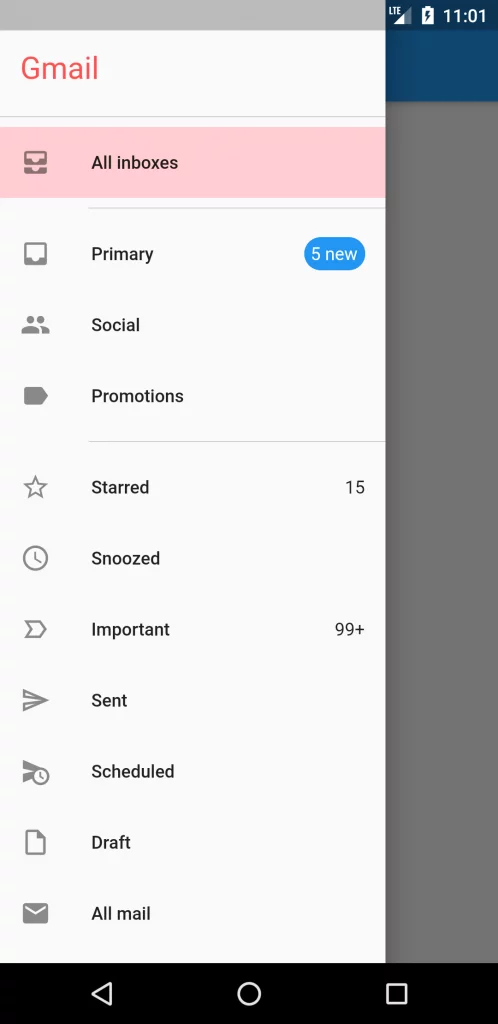
class Sidebar extends StatefulWidget {
  @override
  _SidebarState createState() => _SidebarState();
}

class _SidebarState extends State<Sidebar> {
  String _selectedLabel = 'All inboxes';
  final List<String> _mainFolders = ['Primary', 'Social', 'Promotions'];

  ListTile _tile(
      IconData iconData, String title, int count, VoidCallback _onTap) {
    Widget countString = Text('');
    if (count > 0) {
      countString = count > 99 ? Text('99+') : Text('$count');
    }

    if (_mainFolders.contains(title) && count > 0) {
      countString = Container(
        padding: EdgeInsets.all(4.0),
        decoration: BoxDecoration(
            border: Border.all(
              color: Colors.blue,
            ),
            borderRadius: BorderRadius.all(Radius.circular(20)),
          color: Colors.blue
        ),
        child: Text('$count new', style: TextStyle(color: Colors.white),),
      );
    }

    return ListTile(
      tileColor: _selectedLabel == title ? Colors.red[100] : Colors.transparent,
      leading: Icon(iconData),
      title: Text('$title'),
      trailing: countString,
      onTap: _onTap,
    );
  }

  @override
  Widget build(BuildContext context) {
    return Drawer(
      child: ListView(
        children: [
          Padding(
            padding: EdgeInsets.all(16.0),
            child: Text('Gmail',
                style: TextStyle(fontSize: 24, color: Colors.redAccent)),
          ),
          Divider(color: Colors.grey),
          _tile(Icons.all_inbox, 'All inboxes', -1, () {
            setState(() {
              _selectedLabel = 'All inboxes';
            });
          }),
          Divider(
            color: Colors.grey,
            indent: 70.0,
          ),
          _tile(Icons.inbox, 'Primary', 5, () {}),
          _tile(Icons.group, 'Social', -1, () {}),
          _tile(Icons.label, 'Promotions', -1, () {}),
          Divider(
            color: Colors.grey,
            indent: 70.0,
          ),
          _tile(Icons.star_border_outlined, 'Starred', 15, () {}),
          _tile(Icons.schedule, 'Snoozed', -1, () {}),
          _tile(Icons.label_important_outline_sharp, 'Important', 100, () {
            setState(() {
              _selectedLabel = 'Important';
            });
          }),
          _tile(Icons.send_outlined, 'Sent', -1, () {}),
          _tile(Icons.schedule_send, 'Scheduled', -1, () {}),
          _tile(Icons.insert_drive_file_outlined, 'Draft', -1, () {}),
          _tile(Icons.mail, 'All mail', -1, () {}),
          _tile(Icons.report_gmailerrorred_outlined, 'Spam', -1, () {
            setState(() {
              _selectedLabel = 'Spam';
            });
          }),
          _tile(Icons.restore_from_trash_outlined, 'Trash', -1, () {}),
          Divider(
            color: Colors.grey,
            indent: 70.0,
          ),
          Padding(
            padding: const EdgeInsets.all(16.0),
            child: Text('LABELS'),
          ),
          _tile(Icons.label_outline, '[Imap]/Sent', -1, () {}),
          _tile(Icons.label_outline, '[Imap]/Trash', -1, () {}),
          _tile(Icons.label_outline, 'Work', -1, () {}),
          Divider(
            color: Colors.grey,
            indent: 70.0,
          ),
          _tile(Icons.add, 'Create New', -1, () {}),
          Divider(
            color: Colors.grey,
            indent: 70.0,
          ),
          _tile(Icons.settings_outlined, 'Settigs', -1, () {}),
          _tile(Icons.feedback_outlined, 'Send Feedback', -1, () {}),
          _tile(Icons.help_outline, 'Help', -1, () {}),
        ],
      ),
    );
  }
}